 EN
EN  DE
DE  IT
IT New app feature:
Route planner

Step 1 - Create route:
Open the route planner in the app. You can find this in the footer menu via the "Route planner" menu item. Now you can create your route by entering your start and destination. Optionally, you can also add any stopovers that you want to visit along the way. Click on "Calculate route" and the route will be calculated for you.

Route options:
In the route options, you can choose whether you want to drive on toll roads, avoid motorways and which fuel your vehicle uses in order to arrive at your destination as fuel-efficiently as possible.
Step 2 - Find parking spaces:
Once your route has been loaded, you can now see on the map which pitches are waiting for your visit along the route.
You can easily add the desired partner farms to your route as a stopover by first tapping on the respective farm and then on "Add stopover".


Step 3 - Save route:
Once all the parking spaces have been selected, the route is simply saved. You can select any name and access the saved routes again later.
Step 4 - Drive off:
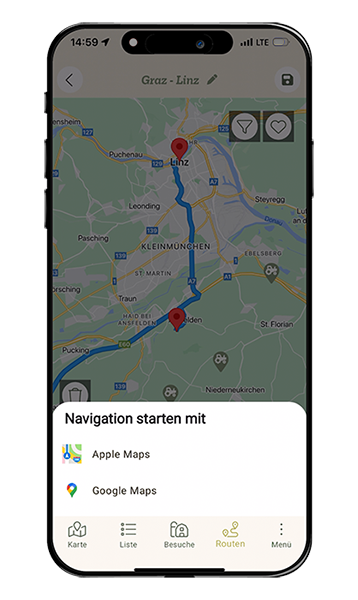
Finally, you can start the route with a map or navigation app of your choice and off you go.
We wish you a wonderful journey and marvellous experiences at the partner farms on the routes.